 Request A Quote
In today’s hyper-connected digital era, your website is often the very first interaction a potential customer has with your brand. It serves as your digital storefront, your 24/7 sales representative, and the core of your online identity. A poorly designed website can drive users away in milliseconds, while a meticulously crafted one can convert casual visitors into lifelong loyal customers. But how exactly are these stunning, high-performing websites brought to life? The secret lies in the tools behind the scenes.
Whether you are an aspiring freelance designer, a small business owner looking to DIY your online presence, or someone searching for the right tools to collaborate with a top Website Designing Company In Delhi, understanding the landscape of modern website design software is absolutely crucial. The tools available today range from simple drag-and-drop builders for beginners to complex, highly technical environments for seasoned UI/UX professionals.
In this comprehensive, deep-dive guide, we will explore the top website design software available on the market today. We will break them down into categories, analyze their features, weigh their pros and cons, and help you determine which tool is the perfect fit for your specific project requirements.
- The Heavyweights of UI/UX Prototyping
Before a single line of code is written, a website must be conceptualized, wired, and visually designed. UI (User Interface) and UX (User Experience) design software allow creators to build interactive mockups and prototypes. These tools are the absolute favorites of professional design agencies worldwide.
Figma: The King of Collaborative Design
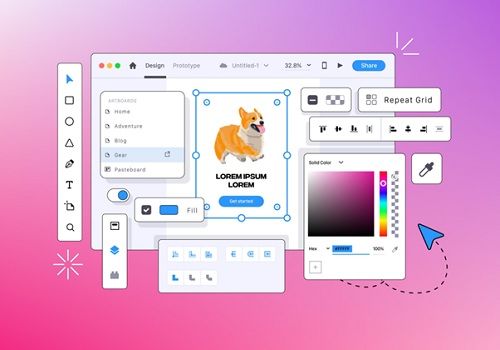
Figma has completely revolutionized the web design industry. As a cloud-based design tool, it allows multiple designers, developers, and stakeholders to collaborate on the same project in real-time, much like Google Docs but for complex visual design.
Key Features:
- Real-Time Collaboration: Team members can leave comments, make edits, and brainstorm on the same canvas simultaneously.
- Vector Networks: Figma’s unique approach to vector graphics makes drawing complex shapes incredibly intuitive.
- Auto Layout: This feature allows designs to grow to fill or shrink to fit, translating beautifully into responsive web design principles.
- Vast Plugin Ecosystem: From generating placeholder text to checking color contrast for accessibility, there is a plugin for almost everything.
Why Professionals Love It:
If you hire a reputable Website Designing Company In Delhi, there is a very high chance they will present your initial website mockups via a Figma link. It bridges the gap between designers and developers seamlessly, allowing developers to inspect design files and extract CSS, iOS, or Android code snippets directly.
| Pros | Cons |
| Industry standard for UI/UX | Requires a constant internet connection |
| Exceptional real-time collaboration | Can be resource-heavy on older machines |
| Generous free tier for beginners | The sheer number of features can overwhelm novices |
Adobe XD: The Powerhouse of Integration
Adobe XD is Adobe’s dedicated answer to modern UI/UX design. For designers who are already deeply entrenched in the Adobe Creative Cloud ecosystem (using Photoshop, Illustrator, etc.), Adobe XD feels like a natural extension of their workflow.

Key Features:
- Voice Prototyping: A unique feature that allows designers to create voice-activated interactions, which is increasingly important for modern web accessibility.
- Repeat Grid: This tool allows you to replicate elements like lists or photo galleries across your artboard instantly, saving hours of manual labor.
- Auto-Animate: Easily create micro-interactions and smooth transitions between artboards to simulate the final user experience accurately.
Why Professionals Love It:
It is incredibly fast and lightweight. The ability to seamlessly drag and drop assets directly from Photoshop or Illustrator into XD makes it a powerhouse for complex, graphic-heavy website designs.
- The Best No-Code and Low-Code Visual Builders
Not everyone wants to hand off a design to a developer. Sometimes, you want the design software to actually build the functional website simultaneously. This is where visual website builders come in.
Webflow: The Developer’s Visual Canvas
Webflow sits in a unique category of its own. It is not just a mockup tool, nor is it a simplistic drag-and-drop builder. Webflow is a visual development platform that generates clean, semantic, production-ready HTML, CSS, and JavaScript as you design.
Key Features:
- True CSS Styling: You control flexbox, CSS grid, typography, and spacing visually, but with the exact logic a developer would use.
- Complex Interactions: Webflow’s interaction engine allows you to build complex scroll-based animations and hover effects without writing a single line of custom JavaScript.
- Built-in CMS: It features a highly customizable Content Management System that allows you to structure dynamic content exactly how you want it.
Why Professionals Love It:
Webflow is the ultimate tool for designers who want total control over the final product without having to learn deep backend coding. Many modern agencies are pivoting to Webflow because it drastically reduces the time between the design phase and the live launch.
| Pros | Cons |
| Limitless design customization | Extremely steep learning curve |
| Outputs incredibly clean code | Pricing can get expensive for multiple sites |
| Ultra-fast hosting via AWS | Not ideal for complex, large-scale e-commerce |
Wix and Squarespace: The Beginner’s Best Friends
For small businesses, freelancers, and portfolio sites, sometimes Webflow is overkill. This is where tools like Wix and Squarespace shine. They are designed for people who have zero coding knowledge but want a beautiful, professional-looking website quickly.
- Squarespace: Known for its breathtaking, award-winning templates. It is the go-to platform for creatives, photographers, and boutique businesses. Its design system is somewhat rigid, but that rigidity ensures your site always looks aesthetically pleasing.
- Wix: Offers a more unstructured editor (Wix Editor) and an AI-driven approach (Wix ADI). It provides immense freedom to drag elements anywhere on the screen, making it incredibly flexible, though it requires a good eye to ensure the mobile version looks just as good as the desktop one.
- The Giants of Content Management Systems (CMS)
If your website is going to be heavily content-driven—like a large news portal, a massive corporate blog, or a complex enterprise site—you need a robust CMS.
WordPress: The Undisputed Ruler of the Web
It is a well-known fact that WordPress powers over 40% of the entire internet. While it started as a simple blogging platform, it has evolved into the most powerful and versatile website design and management software in existence.
Key Features:
- Open-Source Freedom: The core software is 100% free. You own your data, and you can host your website anywhere you choose.
- The Plugin Architecture: With over 50,000 free plugins (and countless premium ones), you can add almost any functionality to your site—from SEO optimization tools like Yoast to complex membership portals.
- Page Builders: Tools like Elementor, Divi, and Beaver Builder have transformed WordPress from a clunky backend system into a fluid, visual front-end design experience.
Why Professionals Love It:
Scalability. You can build a one-page local business site or a massive, multi-national corporate portal on the exact same framework. If you engage a seasoned Website Designing Company In Delhi, they will likely recommend WordPress for complex projects that require deep SEO customization, custom post types, and scalable architecture.
| Pros | Cons |
| Unmatched flexibility and scalability | Requires active maintenance (updates, backups) |
| Massive global community for support | Security can be an issue if poorly managed |
| Best platform for Search Engine Optimization | Can become slow if bloated with too many plugins |
Shopify: The E-Commerce Specialist
When it comes to designing an online store, Shopify is the gold standard. While it is a specialized tool, its theme editor and app ecosystem allow for incredible design flexibility tailored specifically for selling products.
It handles all the complex backend necessities of e-commerce—like payment gateways, tax calculations, and inventory management—leaving you free to focus on designing a beautiful storefront that converts visitors into buyers.
- How to Choose the Right Software for Your Needs
With so many powerful tools available, making the right choice can feel overwhelming. Your decision should be based on three primary factors: your technical skill level, your project’s specific requirements, and your budget.
- For the Absolute Beginner: If you need a website launched by this weekend and have no coding experience, Squarespace or Wix are your best options. They abstract away the technical headaches and let you focus purely on content and basic aesthetics.
- For the Aspiring Designer/Developer: If you want absolute pixel-perfect control and are willing to learn the logic behind web development (without necessarily writing the code), Webflow is unparalleled. It is the future of visual web development.
- For the E-Commerce Entrepreneur: Do not reinvent the wheel. If your primary goal is to sell physical or digital products, Shopify provides the most secure, reliable, and design-friendly ecosystem.
- For the Content King and the Scaler: If you are building a massive blog, a corporate site that will grow over time, or a highly customized web application, WordPress remains the champion.
- For the UI/UX Professional: If you are designing a mock-up to hand off to a development team, Figma is the current industry standard, with Adobe XD trailing closely behind for those locked into the Adobe ecosystem.
- Why Partnering with a Professional Agency Makes Sense
While these software tools have democratized website creation, designing a truly effective, high-converting, and SEO-optimized website is still an intricate art and science. It is not just about making things look pretty; it is about user psychology, site speed optimization, technical SEO, mobile responsiveness, and security.
This is exactly where professional intervention becomes invaluable. As your business scales, the DIY approach often hits a ceiling. Partnering with a premier Website Designing Company In Delhi ensures that you aren’t just getting a template pulled off the shelf.
Professional agencies use tools like Figma to prototype bespoke user journeys tailored to your target audience. They then leverage platforms like Webflow or custom WordPress development to build blazing-fast, secure sites that rank high on Google and drive real business results. They understand the nuances of local markets, consumer behavior, and the technical intricacies that make a website not just a digital brochure, but a powerful business engine.
Conclusion
The landscape of website design software has never been richer or more accessible. From the collaborative brilliance of Figma to the development power of Webflow, and the endless scalability of WordPress, there is a tool perfectly suited for every vision and skill level.
Choosing the right software is the first critical step in your digital journey. Take the time to evaluate your long-term goals, experiment with the free trials most of these platforms offer, and don’t hesitate to seek out professional design partners when your ambitions outgrow your current technical capabilities. Your website is your digital legacy—build it with the right tools.
 Have a project in mind? Get in Touch